|
CrazyFrog Posts: 8
4/17/2023
|
Hello,
We just installed a new computer with DG16.5 and for some reason now when we try to either open from PulseCloud ro Share to PulseCloud we are getting script errors.
We are getting the errors on DG16 and DG15 on the same computer, however the other computers seem to be working fine.
The computer is running Windows 11 Pro.
From what I have read on the forums here and other places, this is to do with Internet Explorer no longer bing supported, however there is no Internet Explorer installed on the computer anyway.
We have already tried the setting the default browser to either Edge or Chrome and neither fixed the issue.
Any insite as to why this issue would be happening would be greatly appreicated.
Thanks
|
|
|
0
link
|
|
Tajima Software Administrator Posts: 589
4/18/2023
|
Hello,
We are currently testing a new build of DG16 that fixes the scripts issue you mentioned.
If the issue is urgent, let us know and we can get you in touch with support for a quicker solution.
|
|
|
0
link
|
|
MyTFresh Posts: 3
2/8/2024
|
same problem, any fix yet?
|
|
|
0
link
|
|
Tajima Software Administrator Posts: 589
2/9/2024
|
The latest DG16 official available for download has a fix for this problem.
Unfortunately the same fix can’t be applied to DG15.
|
|
|
0
link
|
|
MyTFresh Posts: 3
2/9/2024
|
Okay thanks, We have DG16 but the problem still exists. Any way to update it?
|
|
|
0
link
|
|
Tajima Software Administrator Posts: 589
2/13/2024
|
Yes, you can download the latest version here:
https://cloud.pulsemicro.com/Download
If the problem persists we can get you in touch with support.
|
|
|
0
link
|
|
TheFinishingTouch Posts: 25
2/16/2024
|
We have DG16 and the latest download has not corrected the scripts issue. PulseCloud continues to try to open in Internet Explorer rather than Edge or Chrome. I have found that if I right click on the link for a PulseCloud article and select "open in a new window" I avoid the scripts error messages. Certainly not a "fix", but a work-around.
|
|
|
0
link
|
|
Tajima Software Administrator Posts: 589
2/22/2024
|
@TheFinishingTouch we will reach out via private message and get a support ticket started for your report.
|
|
|
0
link
|
|
IMAIND Posts: 1
1/31/2025
|
tengo un error de scrip
|
|
|
0
link
|
|
CrazyFrog Posts: 8
3 days ago
|
Hiya Guys, for some unknown reason Pulse Cloud has signed me out & I can’t get back in ?? This has happened to me before Approx 2yrs ago …
I also can’t remember if I am under CrazyFrog or CrazyFrogEmbroidery …
Some help would be much appreciated … I look forward to your Reply …
Thank you & have a Great day …
|
|
|
0
link
|
|
Tajima Software Administrator Posts: 589
3 days ago
|
Hi CrazyFrog. Please try resetting your password using the Reset Password button at the bottom of the PulseCloud login page.
Let us know if that helps you get back in.
|
|
|
0
link
|
|
CrazyFrog Posts: 8
2 days ago
|
Thank you for your Reply ... I can't see a Reset Password button at the bottom of the page of the PulseCloud Login ??
Also I don't know if i'm supposed to be under CrazyFrog or CrazyFrogEmbroidery ....
I look forward to your reply ...

|
|
|
0
link
|
|
izšuvums.lv Posts: 33
2 days ago
|
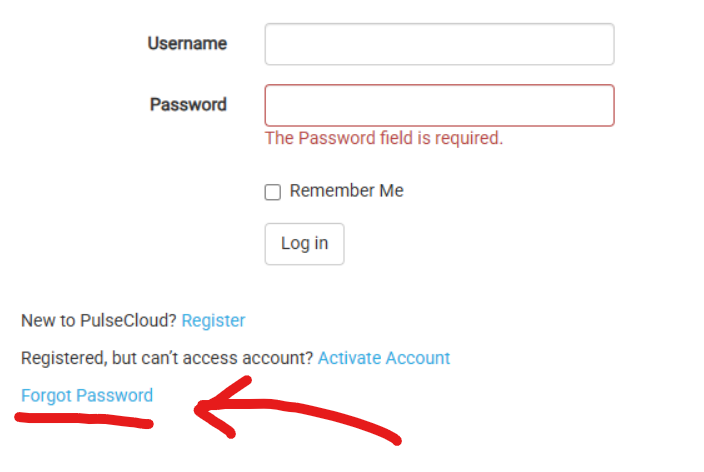
CrazyFrog wrote:
Thank you for your Reply ... I can't see a Reset Password button at the bottom of the page of the PulseCloud Login ??
Also I don't know if i'm supposed to be under CrazyFrog or CrazyFrogEmbroidery ....
I look forward to your reply ...
|
|
|
0
link
|
|
CrazyFrog Posts: 8
1 days ago
|
Thank you for your Reply .... I have done that numerous times & tried it again just now & it won't work under
the Username CrazyFrog or CrazyFrogEmbroidery as below ...


|
|
|
0
link
|
|
Tajima Software Administrator Posts: 589
20 hours ago
|
@CrazyFrog it appears there was some maintenance being done on PulseCloud which is the reason for the error. Please try again.
|
|
|
0
link
|